
This month at Modulr, we’re bringing you a range of updates to make payments and spend control simpler and more powerful. We’re launching Spend Management and rolling out a Configurable Cards List in the Travel Portal so teams can tailor and export exactly the card data they need. Looking ahead, we’re making improvements to file upload and payment search in the Portal, adding a Failed Authorisations Dashboard in the Travel Portal, and exploring Stablecoins.
Dive in below to explore what’s new and what’s next.
New Products
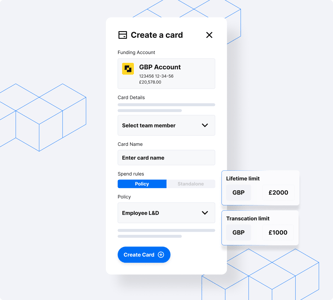
Spend Management
Control business spending with company cards and automatic receipt capture.
Control business spending with company cards and automatic receipt capture.
Spend Management with Modulr gives finance teams control before funds move, making company cards a governed, automated, and scalable part of finance operations.
Manage Card Spend: Give your teams the flexibility they need, without losing control.
Subscription Management: Keep recurring spend visible, predictable, and under control.
Accounting Sync: Close the loop between spend and your ledger.
Employee Expenses*: Turn employee expenses from a manual, after‑the‑fact process into a controlled, real‑time workflow.
*We are rolling out features in stages. Employee Expenses will be available in the next phase.
New Features

Modulr Portal
Modulr Payment File Now Available in Moneysoft
Moneysoft now supports the Modulr payment file format, making it easier to process payments through your Modulr account.
Getting started is simple:
- Enter your Modulr account number and sort code in Employer Settings within Moneysoft.
- When creating your payment file, select the Modulr layout.
- Log in to your Modulr account and upload the file.
To use this feature, please ensure you’re running the latest version of Moneysoft (released January 2026).
Travel Portal
Customisable Card List
Your Card List, Your Way
No two travel businesses manage virtual cards alike. Some handle thousands of single-use cards across multiple currencies. Others use custom fields to track bookings.
We created a view that suits everyone.
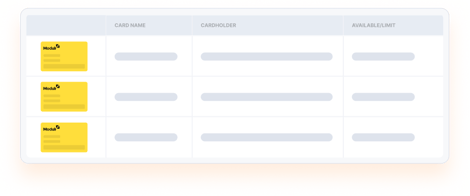
Configurable Card List is now live in the Modulr Travel Portal. Select which columns appear in your card list, including properties previously visible only inside individual card records, such as card spend, authorisation windows, expiry dates, and custom fields. Hide what you don't need.
When you export, your download matches exactly what you see, providing a real-time, tailored export without waiting for reports.
Your configuration saves between sessions, so you only have to set it up once.
This is just the start. We're exploring more ways to simplify managing cards at scale.
Log in to the Modulr Travel Portal to try it out.
Coming Soon
The Modulr Portal
File Upload Redesign
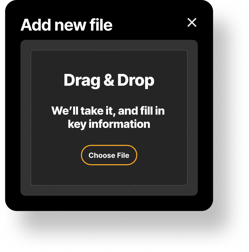
Resolving payment file errors shouldn't feel like detective work. That's why we've been rethinking the entire payment file upload experience from the ground up.
Soon, you'll be able to:
- See exactly where errors are: with clear line numbers that match your actual file, no guesswork required.
- Spot the problem instantly: we'll highlight the exact value causing the issue, and let you copy it to find and fix it in seconds.
- Understand what went wrong: every error will include plain-language guidance on what a valid value looks like, so you can resolve issues with confidence.
We know that uploading payment files can be time-sensitive, especially when salaries are involved. This redesign is all about helping you move faster, stress less, and get back to what matters.
We can't wait to share more. Stay tuned.
Modulr Portal
Payment Search
We’re building a dedicated Search screen that's fast, powerful, and saves you time when finding payments. No more switching screens or cross-referencing transactions.
Search smarter, not harder. Query payments using parameters like Payment ID, External Reference, Account ID, Amount, Created Date, and Scheduled Date. Results cover up to 180 days of payment history.
Batches are searchable too. You can search batches by Batch ID or Reference. This benefits teams managing high-volume payments.
See the full picture. Search covers the entire payment lifecycle: Approvals, Pending, Exceptions, and Completed. No need to reconcile with Transactions to track a completed payment.
Take action instantly. Find what you need? Approve, Cancel, Reject, or run a payee check directly from the Search screen. No extra clicks, no wasted time.
Travel Portal
Failed Authorisations Dashboard
Declined transactions can equate to lost bookings, rebooking at a higher price, a frustrated guest, or even a strained supplier relationship. Until now, understanding why a card was declined meant digging through individual cards and decoding cryptic processor codes. That's about to change.
Introducing the Failed Authorisations Dashboard. Launching in the coming weeks on the Modulr Travel Portal.
Get a clear, real-time view of your authorisation failures in one place. See what's failing, why it's failing, and what you can do about it.
Here's what's coming:
- At-a-glance failure summary: see the number of declined auths over the last 48 hours
- Top decline reasons: a ranked leaderboard so you can spot patterns instantly
- Actionable categories: every decline is mapped to a plain-English reason with clear next steps (top up funds, extend an auth window, check MCC restrictions)
- Full failure list: browse all declined auths in one view, no more card-by-card detective work
Whether it's insufficient funds, expired cards, or merchant-side issues, you'll know exactly what happened and how to fix it.
Stay tuned. More details coming very soon.

Accounting Integrations
Sage Intacct Integration
We’re working towards the launch of a new Sage Intacct integration as part of the Modulr Accounts Payable (AP) platform - and we’re now inviting customers to register your interest in being part of the Beta test group.
With the Sage Intacct integration, you can:
- Sync bills from Sage Intacct directly into Modulr AP
- Create and approve payment runs in Modulr
- Automatically reconcile completed payments back to your accounting ledger
- Sync vendors, ledgers, and key accounting data to support more of your AP workflow
This integration is designed for customers who already use Sage Intacct and either have Modulr AP today or are looking to upgrade.
Sneak Peek

Stablecoin
We’ve kicked off plans to embed Stablecoins into our platform.
Our goal is to enable our customers to unlock more opportunities and greater efficiencies across a range of payments and treasury management use cases.
We’re currently shaping our roadmap and would welcome conversations with customers interested in exploring further!
Spend Management
Spend Management Mobile App
For our spend management customers, a dedicated mobile experience is currently under development and will be available soon.
This new mobile app aims to provide users with convenient access to key features directly from their smartphones, enhancing their ability to manage expenses efficiently while on the move.
- Easily view your virtual cards within the app: keep track of your available funds and card details at any time.
- Quickly freeze and unfreeze your cards on the go: enhance security and control over your spending.
- Upload receipts for your transactions directly through the app: simplify expense tracking and reconciliation processes.
Additionally, a tap-to-pay feature is planned for future releases, which will allow users to make payments quickly and securely using their mobile devices.
Stay tuned!
