

This month at Modulr, we're bringing you updates that make payments easier to track, manage, and fix. We're launching Spend Management, a new Payment Search experience for full lifecycle visibility in one place, and redesigning the file upload error experience so issues are faster to resolve. In the Travel Portal, the Failed Authorisations Dashboard is now live, giving you instant clarity on every declined transaction. We're also rolling out real-time Failed Payment Notifications, improving our Verification of Payee service, and introducing automatic retries for SEPA Instant payments. And coming very soon, FX capabilites for scale payments.
Dive in below to explore what’s new and what’s next.
New Products
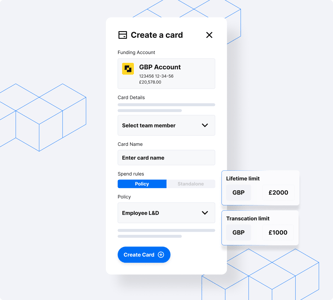
Spend Management
Control business spending with company cards and automatic receipt capture.
Control business spending with company cards and automatic receipt capture.
Spend Management with Modulr gives finance teams control before funds move, making company cards a governed, automated, and scalable part of finance operations.
Manage Card Spend: Give your teams the flexibility they need, without losing control.
Subscription Management: Keep recurring spend visible, predictable, and under control.
Accounting Sync: Close the loop between spend and your ledger.
Employee Expenses*: Turn employee expenses from a manual, after‑the‑fact process into a controlled, real‑time workflow.
*We are rolling out features in stages. Employee Expenses will be available in the next phase.
New Features
API
Real-time visibility of card refunds
Ever wondered if your card refund is actually on its way? Credit authorisations solve that.
When a cardholder requests a refund, merchants will send an authorisation to confirm it can be processed, triggering an instant notification so cardholders know it's in motion, rather than waiting in the dark until the money arrives.
No funds move at this stage. It's simply a real-time signal that the refund is on its way, with money returned once processing is complete.
You'll receive a dedicated webhook as soon as a credit authorisation is created, making it easy to keep cardholders informed at every step. And once the refund lands, it can be matched back to the original authorisation, keeping reconciliation clean and straightforward.
Less uncertainty for cardholders. Less noise for your team.
The Modulr Portal
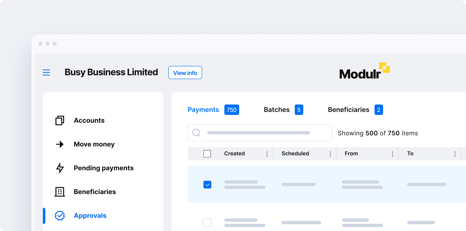
Payment Search
Remember the new search experience we promised? It's here, and it's ready to work as hard as you do.
Payment Search is a dedicated screen built for speed and precision. No more waiting for screens to load, toggling between tabs, or cross-referencing transactions just to track down a completed payment. Every status, including Approvals, Pending, Exceptions, and Completed, is now searchable from one place, giving you full lifecycle visibility for the first time.
Find exactly what you need by searching by Payment ID, External Reference, Account ID, Amount, Created Date, or Scheduled Date, with results spanning up to 180 days of history. Batches are searchable too. Look up any batch by Batch ID or Reference and see an aggregated status across all contained payments.
You can also approve, reject, cancel, or run payee checks directly from your results, with no extra navigation required. Whether you are managing a handful of payments or thousands, Payment Search puts you in control.
Log in to the Modulr Portal to try it out.
The Modulr Portal
File Upload Redesign
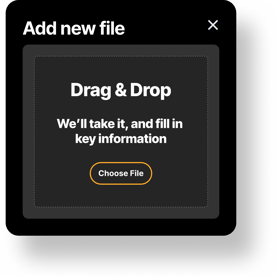
The new payment file upload experience is here, and we have completely rethought how errors are surfaced so you can fix issues fast.
Here's what's new:
-
Exact line numbers: errors now point to the precise line in your file, so there is no more counting rows or guessing past headers.
-
The value that caused the problem: we display it and let you copy it with one click, so you can find and fix it in your file in seconds.
-
Clear, human-friendly guidance: every error now explains exactly what a valid value looks like and how to correct it.
We built this because payment files are often time-sensitive, especially when they contain salary instructions. You should not need to raise a support ticket to figure out what went wrong. This is just the beginning, and we have more improvements on the way to make file uploads even smoother.
Log in to try it now
Travel Portal
Failed Authorisations Dashboard
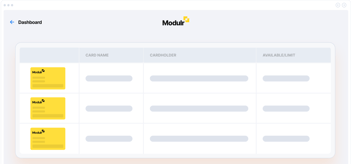
The Failed Authorisations Dashboard is now live in the Travel Portal.
No more digging through individual cards or decoding cryptic processor messages. You now have a single, clear view of every declined transaction.
Here is what you get:
48-hour failure snapshot: log in and instantly see how many authorisations have failed since your last visit.
Decline reason leaderboard: the top reasons ranked by volume, in plain English rather than processor codes.
Full failed authorisations list: every decline in one place, with merchant name, reason, and timestamp. Query up to 7 days of history.
Drill into the detail: tap More Info on any failure to see the raw processor reason, and click through to the card to take action immediately.
Export to Excel: download your failed authorisation data for offline analysis or to share with your team.
Every decline reason is mapped to one of 23 readable categories, grouped by what you can do about it: fix it, investigate it, or note it. The cycle of lost bookings, unexpected rebookings, and confused support teams ends now.
Log in to try it now
The Modulr Portal
Failed payment notification
Never miss a failed payment again. Failed Payment Notifications are real-time email alerts that land in your inbox the moment something goes wrong.
When a payment fails, you will receive a clear, detailed email showing the number of affected payments, a breakdown by currency and total value, and whether failures hit standalone payments or batches, including the batch reference.
You are in control of who receives these alerts, and recipients do not need to be portal users. Simply add any email address to keep the right people informed.
To get started, head to Notifications in the main menu, enable the alert, and add the email addresses you would like to notify.
Coming Soon
The Modulr Portal
Pending Payments Breakup
We are replacing the Pending Payments screen with two purpose-built views designed around how you actually work.
Pending: a clean, focused view of your upcoming and awaiting-funds payments, with flexible search across every column and no unnecessary clutter.
Exceptions: a dedicated space for errors, rejections, and cancellations, with 180 days of history available, a smart 14-day default view, and prominent date controls so you are never hunting for what went wrong.
No more scrolling through a mixed list hoping to spot what matters. No more confusion between what is pending and what has failed. Three screens, three clear jobs: Search for finding, Pending for managing, and Exceptions for investigating.
Built from real feedback across our customer base, this is the payments experience you have been asking for, and it is coming very soon.
Stay tuned!
Sneak Peek
FX built for scaled payments
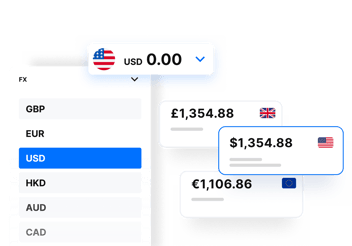
Managing currency shouldn't slow down your operations. That's why we're adding FX capabilities to the Modulr payments automation platform – removing the complexity of currency management, with competitive rates built in.
Convert between GBP, EUR and USD across your own accounts from day one, with card-based FX and additional currencies to follow as the product grows. Reduce friction, control exposure and scale your cross-border operations with the same accuracy, control and reliability you expect from Modulr.
Watch this space.
